

YouTube Parental Control
Get to know what your kids watch on YouTube and ban their access to videos that you deem inappropriate with the YouTube monitoring feature of FamilyTime. With this YouTube monitoring app, you can effortlessly track their watch time and limit YouTube exposure!

What Makes Youtube Parental Monitoring a Must-Have?

Age-Inappropriate Video Content
Not every YouTube video is suitable for children. The app includes pornographic material as well as content about violence, racism, sexuality, gambling, addiction, and everything else you may think of. You can keep your children safe by blocking subjects and videos that you believe are unsuitable.

Dangerous Challenges and Viral Videos
Having witnessed several deadly challenges such as the Blue Whale and Momo, we intend to save our children to the greatest extent possible. Their safety is made possible by the use of YouTube monitoring, which allows us to learn what kids are watching and how frequently they react to these videos.

YouTube Addiction
Because of YouTube’s interesting features and never-ending supply of content, children are the most vulnerable to its addiction. To save children from this hassle, FamilyTime allows parents to limit the amount of time their children spend on this app.

Inadequate Supervision and Control
True, we parents cannot always hover over our children and watch every movie before they see it. As a result, we need a system to prevent them from watching videos that are ill-suited for their age, and we require a YouTube monitoring app such as FamilyTime to do it.
Here’ How You Can Set YouTube Parental Controls
With FamilyTime
Setting up YouTube parental controls with FamilyTime is simple and just takes a few steps.
YouTube App Control
FamilyTime allows you to control your children's access to YouTube by banning or restricting app use. FamilyTime offers YouTube App controls for this purpose, allowing you to define the hours and days when your children may use this application. To use YouTube app control, navigate to the feature from your Dashboard and, using the calendar, specify a time frame for permitting your children access to the app. This is as easy as 1, 2, 3.
YouTube Content Control
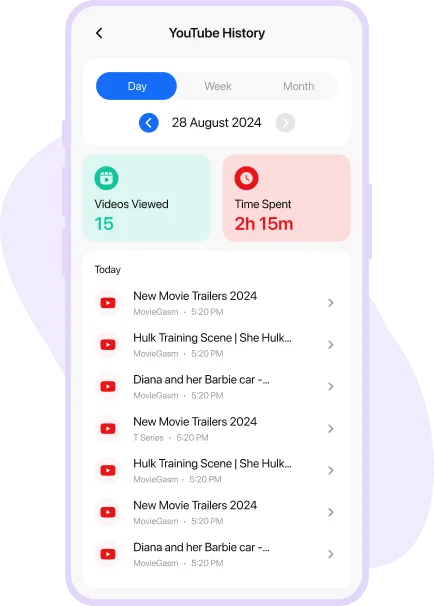
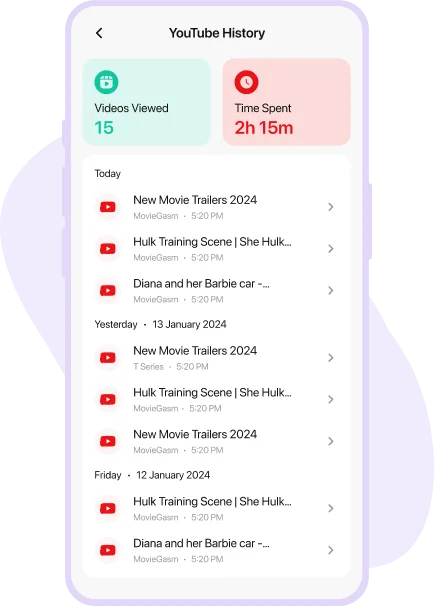
Besides managing the use of the YouTube app for kids, you can also administer the content they watch. To monitor and control content that your kids watch on the Youtube app, browse to their watch history and, if you see a video that is inapt for them, simply tap on the lock button next to the video title. And you're done. The specific subject will be blocked in no time. You can even view information such as time spent on the YouTube app and number of videos watched!
Media Covered Us


YouTube Parental Monitoring Tips and Tricks!
Equip yourself with the necessary knowledge and put YouTube Control for Kids into action
How to Block YouTube
Videos?
Introduce effective ways about how to block harmful videos on Kid's device.
How to Monitor YouTube
Search/Comment History?
Know how to see your kid’s YouTube search/comment history and remotely detect their.
How to Use FamilyTime for
YouTube Monitor?
YouTube is everyone's go-to platform for videos on education, entertainment, sports.

Why FamilyTime is the Best Parental Control App
Take Back Control of Your Family Time with Effortless and Effective Digital Parenting

30-Day Reporting History

FREE Access to New Features

Uninstall Protection

Easy to Use Interface

Co-Parenting Made Easy

GDPR Compliance

One Account Multiple Devices
